
The history of audioutilities.com
From 2002 this domain was a directory of downloadable Windows audio software. It later became an audio blog, then sat parked. In November 2026 it was rebuilt from scratch under new ownership as free tools that run in the browser. We did not run the earlier sites and do not claim their history as our own work.
Timeline
- 2002 The first archived copy of audioutilities.com appears in the Internet Archive: a catalogue of shareware for converting, ripping, recording and editing audio.
- 2003–2008 The directory grows to hundreds of pages: CD to MP3 rippers, WAV/MP3/WMA converters, MIDI tools, ringtone makers and, increasingly, DVD and video converters for iPods and PSPs.
- 2018–2023 The domain carries a WordPress blog with articles about audio formats, Windows sound problems and sound engineering.
- 2023–2026 The domain is parked.
- November 2026 Relaunched as browser-based audio tools. See the changelog.
What it looked like
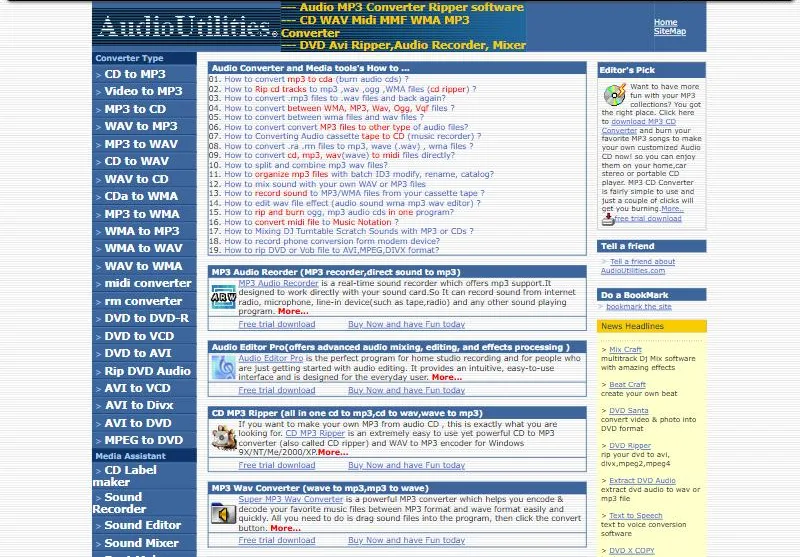
The 2005 site was a typical software portal of its time: a silver logo on a blue bar, a left sidebar of conversions (“CD to MP3”, “WAV to MP3”, “midi converter”), blue title bars on every box, a numbered list of “How to…” questions and small illustrated icons for each program. Each program was a Windows download, usually a trial with a “Buy now” button.
What we kept and what we changed
| 2005 | 2026 |
|---|---|
| Converter Type sidebar | The same directory of conversions, each linking to a converter that runs in the browser |
| Numbered “How to…” list | The same index, each line answered by a tool or a guide |
| Blue title bars and silver logo | Kept as the visual identity |
| Illustrated software icons | New icons drawn in that style for each tool |
| Trial downloads for Windows | Free tools in the browser on any system, nothing to install |
| Files processed by installed software | Files processed in your browser; we never receive them |
Old addresses
Links to the old site still exist around the web. Where an old page answered the same need as a new one (for example /wav-to-mp3/wave-to-mp3-converter.htm), it now redirects to the matching tool or guide. Pages about unrelated software, such as DVD copying programs, return “410 Gone”, because nothing here replaces them.